By Excel
5 Content Calendar Templates for Creators
Immediate delivery
Access right after checkout
Secure purchase
Protected checkout
Library access
Available in your account
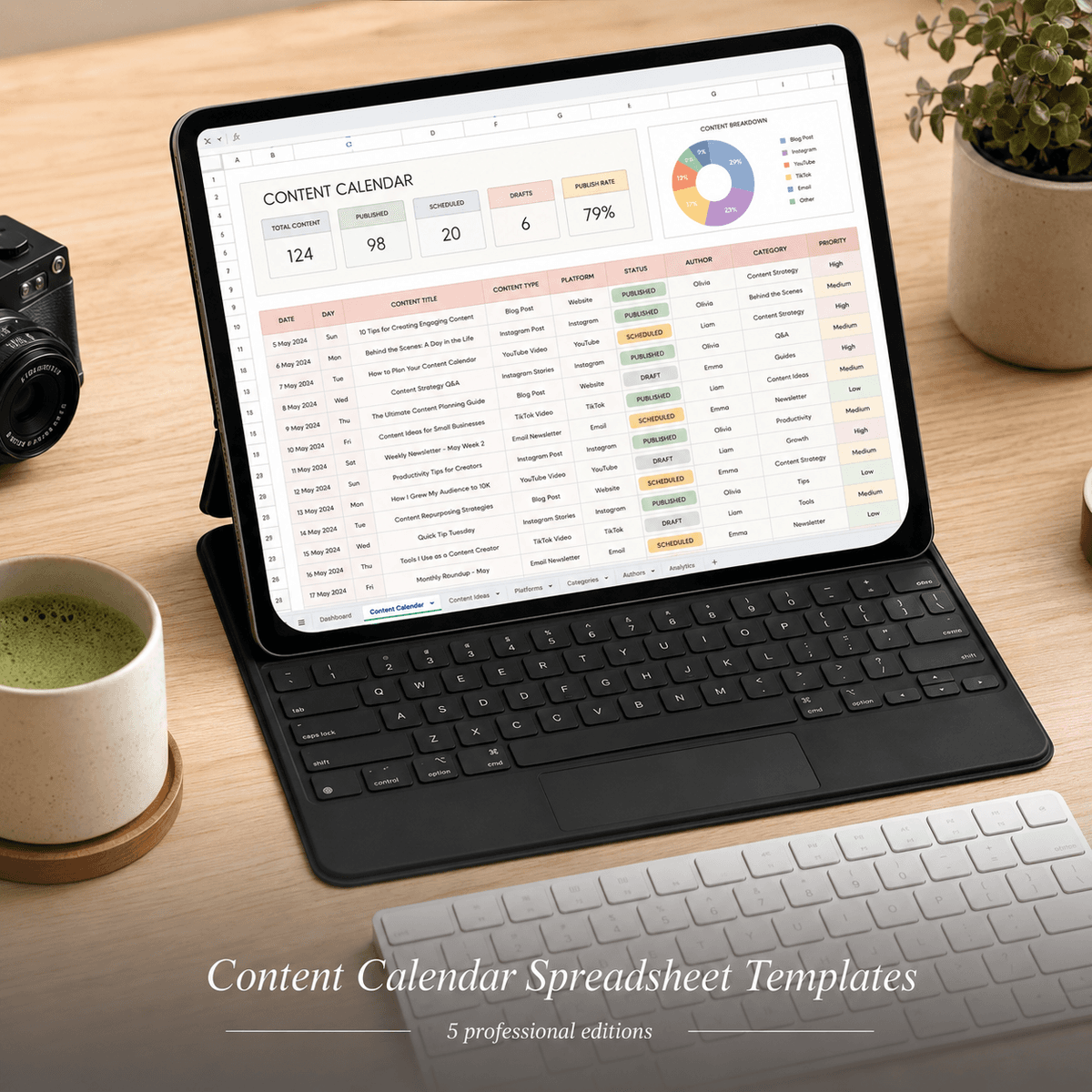
Built for specialists, not generalists
Plan content across 5 platforms with 5 beautiful spreadsheet calendars. Perfect for TikTok creators, product launches & brand strategies.
TikTok creators and small business social managers are drowning in generic, ugly spreadsheets. Free Google Sheets templates lack structure, aesthetic appeal, and the specific workflows real creators need—whether you're chasing TikTok trends, juggling five platforms, launching a product, or building brand consistency. This pack delivers five beautifully designed .xlsx content calendars, each tailored to a distinct planning style: trend-first, multi-platform coordination, launch campaigns, brand storytelling, and engagement optimization. Every edition includes a visual Dashboard, monthly/weekly planning tabs, content idea banks, hashtag trackers, and post-status tracking—all with pre-built formulas that auto-calculate posting frequency, content mix percentages, and engagement goals. The bold design aesthetic (vibrant colors, clean typography, high contrast) makes these calendars screenshot-worthy for Instagram Stories and TikTok behind-the-scenes content. No more wrestling with formatting or building from scratch—just download, personalize your brand colors in the Settings tab, and start planning. Perfect for solo creators aged 22-35 managing their own channels, virtual assistants coordinating client content, or small business owners who need a professional system without hiring a social media manager. Each edition addresses a real workflow gap: TikTok's fast-paced trend cycles, the chaos of cross-posting to Instagram/YouTube/Pinterest, product launch content timelines, long-form brand narrative arcs, or data-driven engagement tactics. Use in Excel or Google Sheets—works offline, no subscriptions, yours forever.
Who this is for
TikTok creators and small business social managers (age 22-35) who need a beautiful, structured system to plan content across platforms.
Who this is NOT for
NOT a basic monthly calendar grid or a bloated Notion workspace with a learning curve. These are offline .xlsx files with pre-built formulas, vibrant aesthetics, and zero subscriptions—download once, use forever.
Up and running in minutes
How to Use: Content Calendar Spreadsheet Templates — Creator Edition Pack (5 Use Cases)
> Ready to use in 5 minutes — open, replace, organize.
---
What You Received
| File | Edition | Use For | |---|---|---| | tiktok-creator-edition.xlsx | TikTok Creator Edition | Open in Excel or Google Sheets | | multi-platform-social-manager-edition.xlsx | Multi-Platform Social Manager Edition | Open in Excel or Google Sheets | | product-launch-planner-edition.xlsx | Product Launch Planner Edition | Open in Excel or Google Sheets | | brand-content-strategist-edition.xlsx | Brand Content Strategist Edition | Open in Excel or Google Sheets | | engagement-focused-creator-edition.xlsx | Engagement-Focused Creator Edition | Open in Excel or Google Sheets | | README.md | — | Product overview | | cover.png | — | Store thumbnail — ignore this |
---
Quick Start (3 Steps)
Step 1 — Open the right edition
Open the .xlsx file that matches your use case. Each edition is pre-configured for a specific context with relevant categories, labels, and sample data.
In Microsoft Excel: Double-click the file to open. In Google Sheets: Upload to Google Drive → right-click → Open with Google Sheets.
---
Step 2 — Start with the Dashboard tab
The spreadsheet opens to the Dashboard tab which shows a live summary. All the numbers on the Dashboard update automatically as you enter data in the other tabs. Start by going to the Setup or Settings tab to enter your goals, budget amounts, or starting values.
---
Step 3 — Replace the sample data
The spreadsheet comes with sample data so you can see it working immediately. Go to the data entry tabs (labelled clearly at the bottom). Delete the sample rows and enter your own data. The Dashboard will update automatically.
> Protected cells: Formula cells are styled differently (different background color). Don't type over them — they calculate automatically.
---
Opening in Google Sheets
Go to Google Drive (drive.google.com) Click + New → File upload and select the .xlsx file Right-click the uploaded file → Open with → Google Sheets The file will convert automatically — all formulas will work as expected
> All formulas in this spreadsheet are compatible with both Excel and Google Sheets.
---
Common Questions
Q: Can I add more rows? Yes — all formula ranges are designed to accommodate additional rows. Just add rows within the data table and the formulas will include them.
Q: Can I change the colors? Yes — select any cell, go to Fill Color in the toolbar, and change it. The design is yours to customize.
Q: Which edition should I use? Pick the edition closest to your use case. The categories, labels, and sample data are pre-configured for that context.
Q: Can I share it with my partner / team? This license is for single-user use. For shared use (household, business team), please purchase additional copies.
---
Questions? Email: shaattrading@gmail.com
Frequently asked
One-time purchase · Instant digital delivery
Instant access after secure checkout
Buy once, unlock immediately in your account.
© 2026 Airoad · All rights reserved